
I was standing in a dealership last month, helping a neighbor shop for a new family SUV. The salesperson pointed to the center screen and said, "And this has Android Auto built right in."
My neighbor nodded. I winced.
Because what the salesperson meant was Android Automotive — the full operating system running on the car's hardware. What my neighbor heard was Android Auto — the phone projection system he already uses in his current car. And the salesperson didn't know the difference.
This is not a trivial mistake. It's a fundamental confusion that Google created, the industry perpetuates, and consumers pay for. And it's getting worse as more automakers adopt Android Automotive in 2026.
I spent eight years building infotainment systems at Harman. I've worked with both of these platforms. And I can tell you: they are not the same thing. Not even close. The naming confusion is entirely Google's fault — but it's costing you money, features, and flexibility.
Here's what you actually need to know.
The Short Version (For When a Salesperson Confuses Them)
Android Auto is a feature on your phone. It projects a car-friendly version of your phone's apps onto your car's screen. You plug in (or connect wirelessly), and your phone does all the work. The car is just a display.
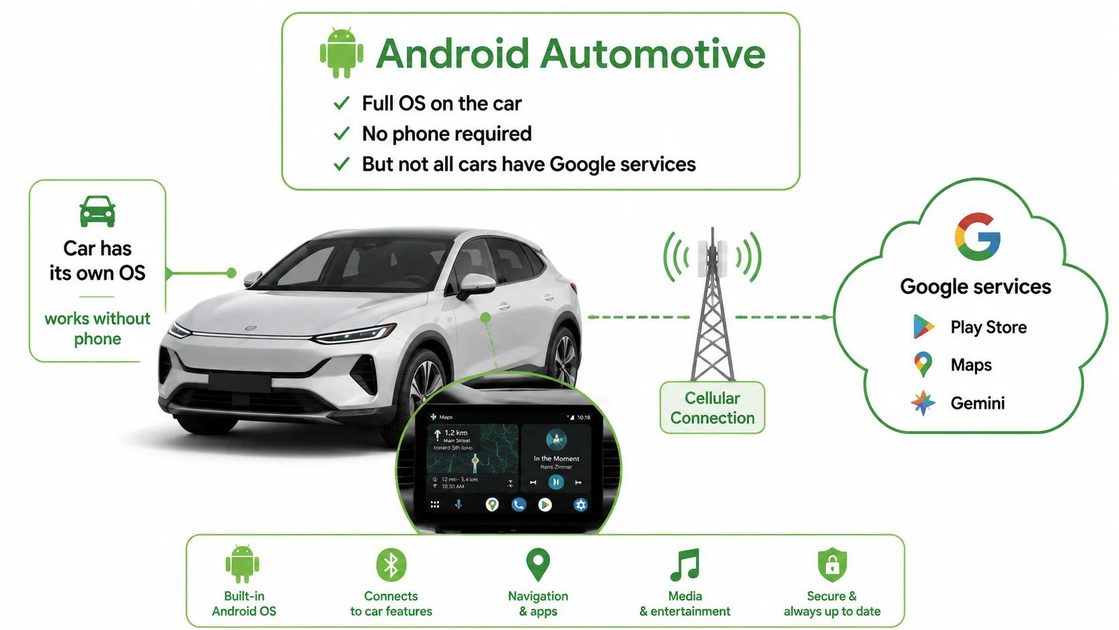
Android Automotive is an operating system that runs on the car itself. It doesn't need your phone. It has its own apps, its own data connection, and it can control things like climate and seats.
Same family name. Completely different DNA.
Android Auto: Your Phone, Projected
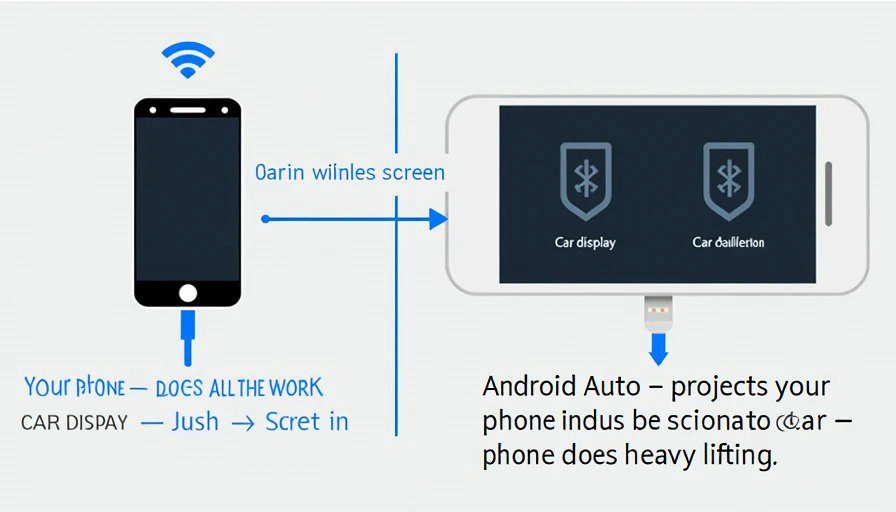
Think of Android Auto as a second screen for your phone. When you connect your Android phone to a compatible car — via USB-C or wirelessly — the car's screen becomes a simplified, driver-friendly interface for apps like Google Maps, Spotify, WhatsApp, and phone calls.
What Android Auto does well:
Always up to date. Since the apps run on your phone, you always have the latest versions. No waiting for the car manufacturer to approve an OTA update.
Massive app library. Any app that supports Android Auto is available — and there are hundreds of them. Navigation, music, podcasts, messaging, EV charging apps, parking apps — it's all there.
Consistent experience. The interface looks the same in every car. Rent a different car? Plug in your phone, and it feels familiar.
No ongoing cost. You're using your phone's data plan. No subscriptions, no monthly fees to the automaker.
What Android Auto doesn't do:
Control the car. It can't adjust your climate, heated seats, or vehicle settings. It's just a screen and speakers.
Work without your phone. Forget your phone? No Android Auto. Simple as that.
Android Automotive: The Car's Own Operating System
Android Automotive (officially Android Automotive OS, or AAOS) is a full Android operating system built into the car's hardware. It's the same Android codebase that runs on phones and tablets — but optimized for the car.
Think of it this way: Android Auto is like casting a video from your phone to a TV. Android Automotive is like having a smart TV with its own apps and internet connection.
What Android Automotive does well:
Works without your phone. Navigation, music, and apps all run on the car itself. You can leave your phone in your pocket (or at home, though I wouldn't recommend that).
Deep vehicle integration. It can control climate, heated seats, window defrosters, ambient lighting, and EV-specific functions. You can ask Gemini to turn on the seat heaters while you're still in the driveway.
Built-in connectivity. Most Android Automotive cars have their own cellular connection, so traffic updates and app downloads don't depend on your phone.
OTA updates. The system can be updated over the air, adding features and fixing bugs without a trip to the dealership.
What Android Automotive doesn't do (yet):
Have all the apps. The app ecosystem for Android Automotive is still growing. You won't find every app you have on your phone. Some apps are only available when the car is parked.
Guarantee Google services. Here's the catch: not every car with Android Automotive has Google apps. Android Automotive is an open operating system. Automakers can choose whether to license Google Automotive Services (GAS) — which includes the Play Store, Google Maps, and Gemini. Some automakers build their own app stores on top of AAOS. If a car has "Google built-in" on the window sticker, you're getting the full Google experience. If it doesn't, you're getting a car with a Google-based OS that may not have Google's apps.
The Real-World Difference: Three Scenarios
Scenario 1: You're a family on a road trip.
With Android Auto, you plug in your phone. Google Maps uses your phone's data. Your kids' tablet is using the phone's hotspot. Your battery is draining fast — even with wireless CarPlay, we measured 18-22% per hour in our earlier test. Better have a charger.
With Android Automotive, the car handles navigation and music on its own cellular connection. Your phone stays in your pocket, charged, ready for emergencies. Maya can ask the car to "find a rest stop with good reviews" without using your data.
Scenario 2: You're buying a used car.
With Android Auto, it doesn't matter what car you buy. As long as it supports Android Auto, you get the same experience. The car's age doesn't limit your apps.
With Android Automotive, the experience depends entirely on the automaker. Did they license Google services? Do they update the system regularly? Can you download new apps? Some cars with Android Automotive are great. Some are locked down and frustrating.
Scenario 3: You're in a rental car.
With Android Auto, you plug in and you're home. Same interface, same apps, same settings.
With Android Automotive, you're learning a new system. Maybe it has Google built in. Maybe it doesn't. Maybe the automaker customized the UI so heavily that it barely resembles Android. Good luck finding the climate controls.
The 2026 Reality: Automakers Are Choosing Sides
In 2026, we're seeing a clear shift. Automakers like Volvo, Renault, Ford, Honda, Polestar, and GM are embracing Android Automotive. Some are moving away from Android Auto entirely.
Why? Data and subscriptions. With Android Automotive, the car has its own connection to the internet. Automakers can offer subscription services — navigation, streaming, remote access — and collect data on how you use the car.
With Android Auto, your phone is the gateway. The automaker sees less. And they can't charge you monthly for features your phone already provides.
This is the real battle. It's not about technology. It's about control.
The Bottom Line: Which One Should You Care About?
If you're buying a new car in 2026:
Ask the salesperson one question: "Does this car have Google built-in, or just Android Auto?"
If they can't answer, find a salesperson who can.
If the car has Google built-in (Android Automotive with GAS):
You're getting the full experience. Google Maps, Play Store, Gemini, and deep vehicle integration. It's the future — and it's genuinely good. But make sure the automaker commits to regular OTA updates.
If the car has Android Auto only:
You're getting the tried-and-true phone projection system. It's reliable, it's familiar, and it doesn't lock you into the automaker's ecosystem. You'll miss out on deep vehicle control, but you'll also avoid subscription fees.
If the car has Android Automotive without Google services:
Proceed with caution. You're getting an Android-based system that may or may not have the apps you want. Test it thoroughly before buying.
Google created this confusion. Two names, one almost identical to the other, describing completely different things. It's like calling both a bicycle and a motorcycle a "motor vehicle" — technically true, but practically useless.
The salesperson at the dealership didn't know the difference. Most consumers don't. And that's not their fault. It's the industry's fault for letting this naming mess persist.
So here's my advice: don't trust the name. Trust the question. Does this car need my phone to work, or does it work on its own?
That question will tell you everything you need to know.
Bench-tested. Kid-tested.