The best upgrade for a car with a boring factory radio isn't a new head unit. It's a portable CarPlay screen. For around a hundred bucks, you can get Apple CarPlay, Android Auto, a touchscreen, and wireless sound in a car that rolled off the line before any of that existed.
I've tested a shelf full of these gadgets in the family SUV, with my four-year-old Maya in the backseat asking for snacks and my wife handing me a sticky cup. This is not a lab test. It's a real-world test. And after living with one for a month, I've got opinions.
A portable CarPlay screen is basically a standalone display that runs CarPlay itself, then talks to your phone over Bluetooth or a cable. It doesn't need the car's software to do anything clever. That's the entire appeal.
What You're Actually Buying
A portable CarPlay screen is a tiny Android computer bolted to a display. Some units are wired only, some are wireless. The good ones have a built-in FM transmitter so your music comes out of the car speakers, not the tinny speaker on the back of the screen.
Prices range from $50 budget units to $250 premium ones. I've had an Akabane and a Carpuride on my bench. The $60 model works fine. The $180 model works better, with a brighter screen and faster boot. I haven't tested every brand, but the ones I have tested share the same core.
Screen Quality Matters
The first thing you'll notice is the display. A cheap screen usually has a 7-inch 1024x600 panel. That's fine, but the viewing angle is narrow and it goes dim in direct sunlight. A premium screen uses an IPS panel with 1280x720 resolution and a brighter backlight.
When you're driving into the Michigan sun, that difference is huge. I ended up cranking the brightness to max on the cheap screen and still squinting. The expensive one was readable with my prescription sunglasses on.
Wireless Is Worth the Extra Cash
A wired portable CarPlay screen is simpler and cheaper. Plug in your phone, and the screen wakes up. But the cable is annoying. I had to buy a right-angle Lightning cable because the port on the screen faces downward.
Wireless screens use Wi-Fi to mirror CarPlay to the display, and they usually need an FM transmitter for audio. Latency is slight -- maybe 200 milliseconds -- but it only shows up if you're adjusting a map while going 70. For maps, music, and podcasts, it's absolutely fine.
The one thing that kills wireless reliability is Bluetooth overlap. If your car has several Bluetooth devices, the screen can drop out. I had to pair my phone to the screen first, then reconnect the car's own system. It's not perfect, but it is a portable CarPlay screen, not a magic wand.
Mounting It in the Real World
The mount is where most of these products fail. Most screens come with a vent clip or a dashboard pad. Vent clips are great in the winter because the heat warms the screen and keeps it from fogging. But they can break cheap plastic vents. My Mazda's vent clips held, but my wife's SUV has fins that are too thin.
The dash pad mount uses a sticky gel pad. It works, but the pad collects dust and stops sticking after a few months. You can buy a CD-slot mount for around $15. That's the best option for cars with a CD player, which is still a lot of older cars.
Installing a Portable CarPlay Screen in a Family Car
Here's the actual install on my daily driver, a 2015 SUV with a factory radio that only has Bluetooth audio.
First, I cleaned the dashboard area and placed the mount. Then I routed the power cable down the side of the dash and into the 12V socket. Many screens come with a cigarette lighter adapter and a very long USB cable.
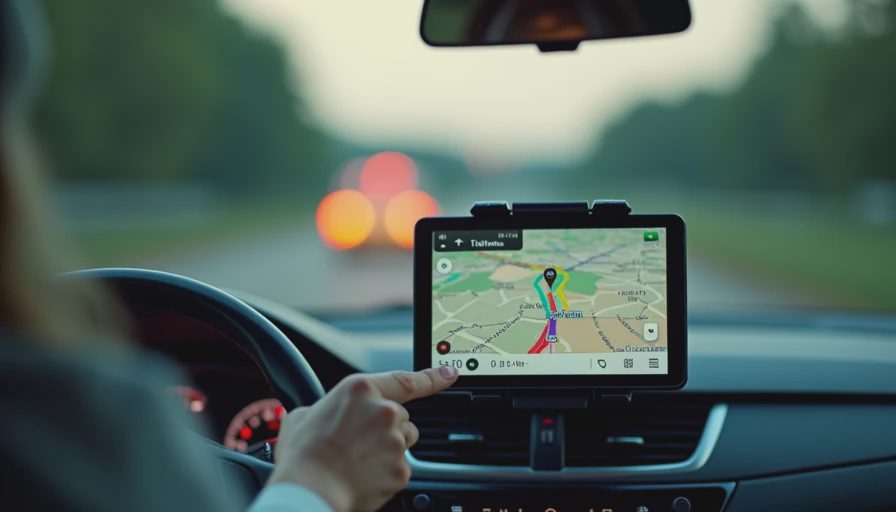
Next, I powered the screen on and paired my iPhone. It took about thirty seconds. The screen asked me to confirm the CarPlay connection on my phone. After that, maps appeared automatically.
For audio, I set the FM transmitter to 88.1 FM, an empty station in my area, and tuned the car radio to the same frequency. The sound was clean with a little hiss, which is typical. If your car has an auxiliary input, use that instead. It sounds much better.
The whole installation took me ten minutes. That's the point. It's not a forever mod. You can move it between cars, take it on vacation in a rental, or pull it out when you park downtown.
Who Should Skip It
A portable CarPlay screen is not always the right answer. If your car already has CarPlay or Android Auto, skip it. If you need a backup camera integrated into the screen, buy a proper head unit instead. And if you have a newer car with a gorgeous factory screen that's just locked behind a subscription, this won't help you bypass it.
There are also safety issues. The screen mounts in your line of sight unless you position it carefully. Put it too low and you won't see it. Put it too high and it can obstruct your view of traffic. It's your job to place it so you're not distracted.
Common Questions About Portable CarPlay Screens
Can a portable CarPlay screen work if your car doesn't have Bluetooth? Yes. You can connect your phone with a USB cable if the screen has a USB input. The audio will need to come from the screen's own speaker, which is weak, or from an FM transmitter. The setup changes, but the idea is the same.
Will one of these screens drain your phone battery? It will if you use wireless, because both Bluetooth and Wi-Fi are running. I plug my phone into a 12V charger while I'm using it. That's an added cost but worth it for long drives.
Are these screens legal to use on the dash? In most states, a screen that mounts to your dash or windshield is legal as long as it isn't blocking your view. I keep mine low and to the right. Check your state law, but you're generally fine.
The Verdict: Bench-Tested. Kid-Tested.
I've been using a portable CarPlay screen for a month now, and it's changed how I drive the family hauler. My daughter can't reach it, which is a win. My wife can read the map at a glance. And I don't have to hold my phone in my hand to know where I'm going.
If you're ready to add CarPlay to your car, start with a mid-range wireless unit, around $120. You get the good screen, the good mount, and the wireless feature without paying the premium for a brand name. I've tested the cheap one, and it does the job for basic GPS. But for daily use, spend a little more.
Whatever you buy, make sure it's a portable CarPlay screen that fits your actual car. Measure your dash, check your vent, and decide between wired and wireless before you check out. Your future self, sitting at a red light with a map on a bright screen, will appreciate it.